How to Edit Concert Photos for Best Results
Introduction Concerts are visually rich events filled with energy, dramatic lighting, and split-second moments. But changing stage lights, mixed color temper...
Introduction
Concerts are visually rich events filled with energy, dramatic lighting, and split-second moments. But changing stage lights, mixed color temperatures, and fast movement make concert images challenging to process. The right editing workflow transforms good concert shots into stunning final images.
This guide covers the best software, a step-by-step Lightroom workflow, and mobile editing techniques for concert photography.
Choosing the Right Editing Software
Adobe Lightroom delivers industry-standard tools for adjusting exposure, color, tone curves, and local masks. Affordable alternatives include Affinity Photo and Capture One. AI-powered tools like Luminar Neo and Imagen help process large batches quickly—especially valuable when stage lighting changes constantly.
For mobile editing, Snapseed, PicLab, and Afterlight offer powerful tools for on-the-go concert photo enhancement.
Selecting the Best Photos to Edit
After a concert, you'll likely have hundreds of images. Filter by composition, lighting, and peak moments. AI culling tools like Aftershoot, Narrative, and Imagen analyze focus and other parameters to create automated shortlists, saving hours of manual sorting.
Lightroom CC Editing Workflow
Step 1: Lens Correction and Cropping
Start with Lens Correction in the Develop Module—enable profile corrections matching your lens. Then crop to refine composition and remove background distractions. The "As Shot" and "8×10" aspect ratios are commonly used for concert prints.
Step 2: Exposure Adjustments
Stage lighting fluctuates constantly. Raw format gives you latitude to recover highlights and lift shadows. Apply global exposure adjustments first, then fine-tune specific areas later with masks. AI tools like Imagen can batch-apply consistent corrections across entire sets.
Step 3: Color Correction and White Balance
Multiple stage lights create color temperature challenges. Adjust temperature and tint sliders to correct color casts. For multi-colored images, consider switching to black and white or applying targeted color corrections with masks. Auto white balance in-camera helps maintain accuracy.
Step 4: Tone Curves
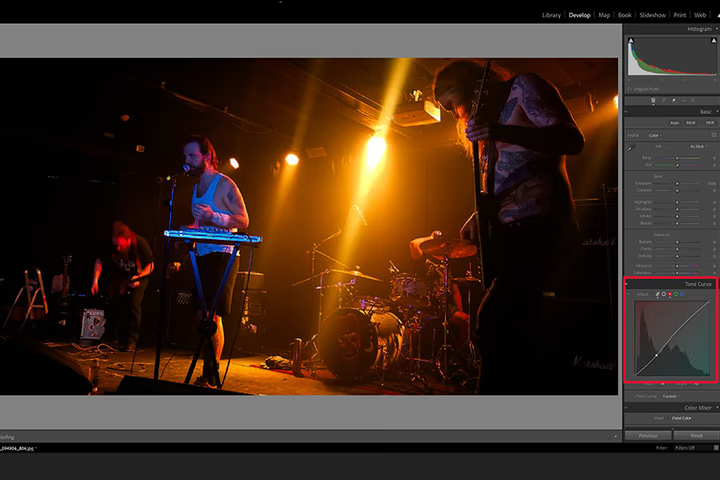
Tone curves offer nuanced color control. Emphasize dominant stage colors, enhance contrast in shadows and highlights, and fine-tune the mood. Add control nodes to target specific tonal ranges. Combined with contrast adjustments, tone curves create dramatic concert imagery.
Step 5: Split Toning
Adjust highlight and shadow hues independently through the split toning panel. The Balance slider controls the transition between tones. Use the eyedropper to select specific colors. Split toning is excellent for enhancing concert atmosphere.
Step 6: Local Adjustments with Masks
Use radial and brush masks to isolate specific areas—the lead singer's face, a guitar's finish, stage lighting effects. Feather mask edges for seamless blending. Lightroom's AI-powered masking identifies subjects automatically, speeding workflow considerably.
Step 7: Black and White Conversion
Many iconic concert photographers work in black and white—Anton Corbijn's high-contrast images are masterful examples. Converting to monochrome creates striking contrast and deeper shadows. Use the Black and White Mix Panel for precise tonal control. If color editing isn't working, black and white often salvages the image beautifully.
Mobile Editing with Snapseed
For smartphone concert photos, Snapseed delivers professional results:
- Perspective and Crop: Use aspect ratio presets and perspective correction
- Tune Image: Adjust brightness, contrast, saturation, and ambience
- White Balance: Correct color temperature and tint
- Curves: Apply RGB curve adjustments with preset options like Faded or Film
- Tonal Contrast: Fine-tune high, medium, and low tones with highlight/shadow protection
- Black and White: Choose from Contrast, Film, or Darken Sky presets, then adjust brightness and grain
Concert Photography Presets
Lightroom presets accelerate concert editing significantly. Free options include Concert Pro presets from Creative Fabrica. Paid collections from Matty Vogel (53-preset bundle), Flourish Presets, and The Luxe Lens offer professional-grade starting points for consistent concert aesthetics.
Practical Tips
- Shoot raw for maximum editing flexibility
- Use Auto white balance in-camera for changing light conditions
- Batch-process with AI tools when handling hundreds of images
- Experiment with black and white when colors are problematic
- Apply masks for targeted adjustments on performers and instruments
- Invest in concert-specific presets for workflow efficiency
- Don't over-process—maintain the authentic concert atmosphere
Conclusion
Concert photo editing transforms challenging lighting scenarios into compelling images. Start with lens corrections and exposure, progress through color and tone adjustments, and finish with targeted local edits. Whether using Lightroom or Snapseed, the key is enhancing the energy and atmosphere that make concert photography so captivating.
FAQ
What's the best software for editing concert photos? Adobe Lightroom is the industry standard. Affinity Photo and Capture One are strong alternatives. For batch processing, AI tools like Imagen save significant time. Snapseed is excellent for mobile editing.
How do I fix mixed stage lighting colors? Adjust white balance temperature and tint first. Use masks for targeted color correction on specific areas. Split toning enhances atmosphere. When colors can't be reconciled, convert to black and white.
Should concert photos be color or black and white? There's no firm rule. Black and white adds dramatic contrast and helps when high ISO introduces grain. Color preserves the concert's authentic atmosphere. Let the individual image guide your choice.
How can I speed up concert photo editing? Use AI culling tools to select the best images. Apply presets as starting points. Batch-process with consistent settings. Use AI-powered masking for faster local adjustments.
What camera settings help with concert photo editing? Shoot raw for maximum flexibility. Use Auto white balance. Set a fast shutter speed (1/250 sec minimum) and wide aperture (f/2.8 or wider). Higher ISO is acceptable if exposure is correct.
Continue reading
61 Best Photography Books for All Levels
September 25, 2026
How to Pose and Photograph Shy, Difficult, or Anxious Pets
September 25, 2026
Master Flow Posing Photography: 9 Dynamic Techniques
July 11, 2026
Photographer Gray Malin's Travel Tips and the Art of the Aerial Beach Photograph
September 27, 2026
Instagram Stars Share Their Secrets to Taking Amazing Photos
September 27, 2026
How to Photograph Children: 29 Tips for Creative and Fun Photos
May 24, 2026
8 Sibling Rivalry Poses That Turn Fights Into Epic Photoshoots
July 11, 2026
9 Steps to Finding the Perfect Wedding Photographer
September 27, 2026
Strike a Pose: Street Style Star Hanneli Mustaparta Shows Us How
September 27, 2026
Want to Know What Your Customers Think? Ask an AI-Generated Focus Group
May 24, 2026
42 Free Photography Books
September 25, 2026
31 Famous Photographers to Know
September 25, 2026
Which Fashion Brands Are Winning the AI Discovery Battle — And Why It Matters More Than SEO
May 24, 2026
Every Chic Londoner Is Wearing One of These 5 Summer Heatwave Staples This Weekend
May 25, 2026
Why People Are Starting to Hate AI — And What Fashion Brands Need to Understand
May 24, 2026